For UK schools, trusts and local authorities
Multi-factor authentication for schools. No mobile phone required.
Protect staff accounts and school systems without relying on personal mobile phones. Simple sign-in options for pupils, flexible authentication for staff and predictable school-wide licensing.
Why schools need an alternative
Multi-factor authentication (MFA) stops a stolen password from being enough to open an account. The Department for Education (DfE) cyber security standard for schools and colleges says MFA must be enabled for staff accounts with access to cloud services or remote access to on-site systems, and for IT administrative accounts.
The usual approach relies on a mobile phone. In schools, that is often where the difficulty starts.
Phone policies
Many schools limit mobile phone use during the school day, so a code sent to a phone or an authenticator app is not always practical.
Pupils without smartphones
Many pupils, particularly younger ones, do not have a personal smartphone to authenticate with.
Staff and personal devices
Some staff prefer not to use a personal phone for work, and many schools would rather not require it.
Shared computers
ICT suites, classrooms and libraries are used by many people every day. Sign-in needs to be quick and must not depend on one person’s device.
Small teams, tight budgets
School IT teams are often small, and paying per user for every pupil can be hard to justify.
Source: DfE, cyber security standards for schools and colleges.
How Swivel Secure works
AuthControl Sentry® gives you a choice of authentication methods. Phone-free options are available alongside app, push and text message methods, so you can choose what suits each group of users.
No phone needed
PINpad
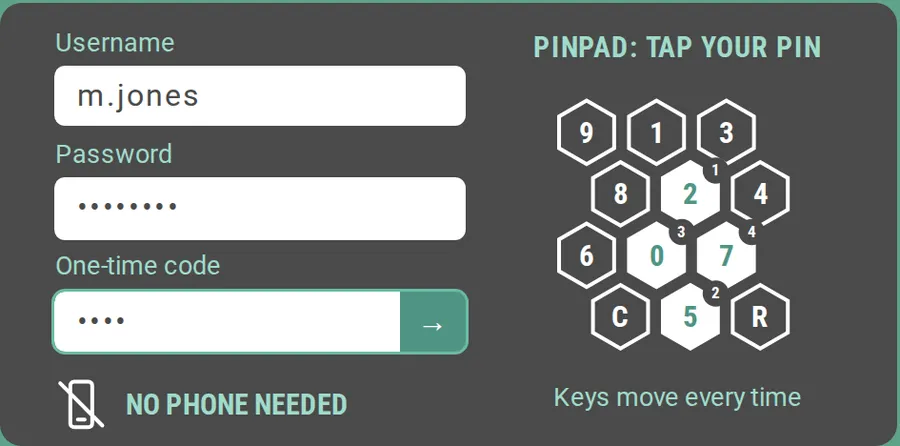
Staff tap their PIN on a scrambled on-screen keypad, shown at the top of this page. The keys move every time, so the pattern cannot be copied, and there are no hardware tokens to buy.
PINsafe®
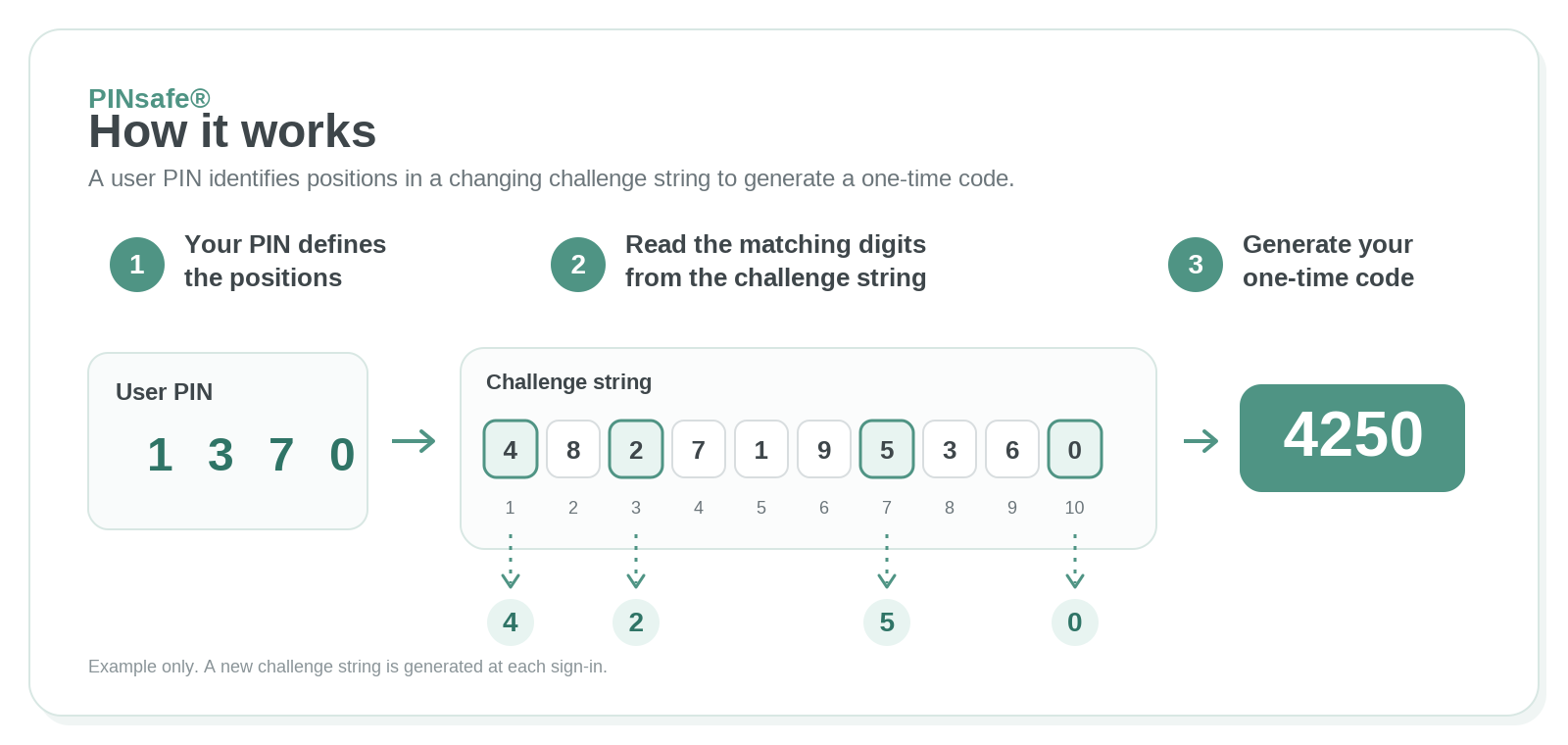
The user’s PIN picks out positions in a security string that changes at every login. They enter the characters in those positions as a one-time code, so the PIN itself is never typed or sent.
Pupils
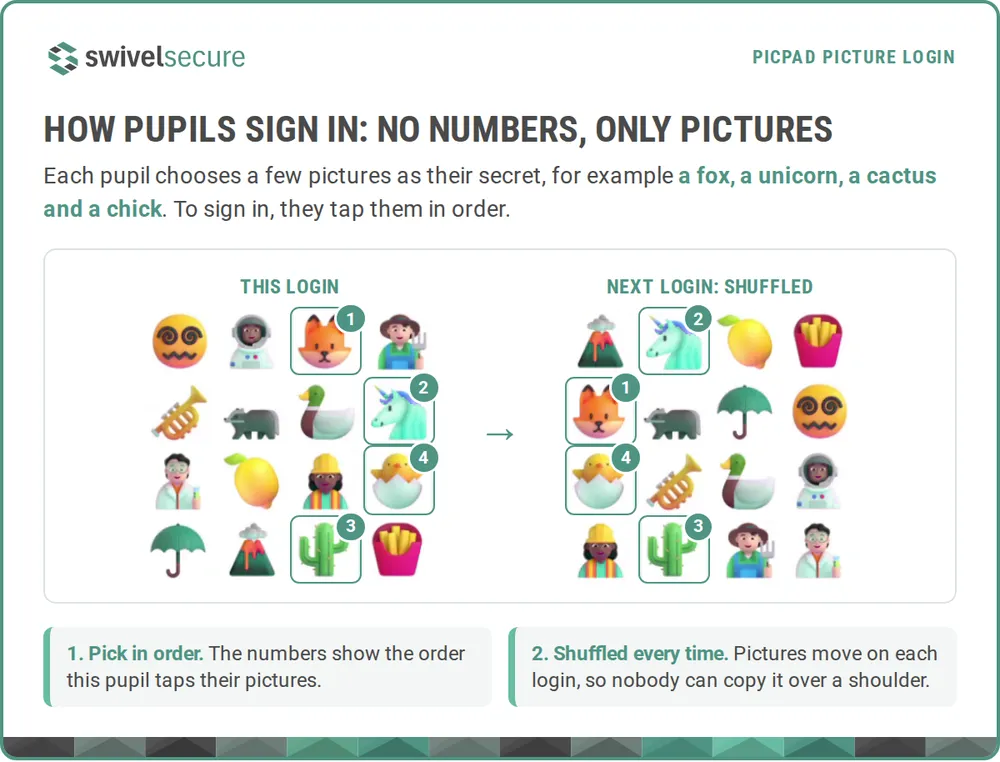
PICpad picture login
- Each pupil chooses a few pictures and taps them in order.
- The grid shuffles at every login, so nobody can copy it over a shoulder.
- No numbers to remember, which suits younger pupils.
Picture login is available where the application and sign-in route support it. We will confirm this for your systems.
Choices for staff
Staff can also use the Swivel mobile app, push notifications, text messages or hardware tokens where that suits them. You decide which methods are allowed for which users. The licence includes support for every authentication method; physical tokens are optional and purchased separately.
Works with your existing systems
Swivel adds MFA to the systems you already use. You keep your accounts and applications.
- Microsoft 365
- Google Workspace for Education
- Windows logon
- Chromebooks
- Citrix
- F5
- Palo Alto
- RADIUS
- SAML
Straightforward school licensing
One annual site licence per school covers every member of staff and every pupil. The price depends on the number of users in the school.
| Users per school (staff and pupils) | Typical school | Price per year |
|---|---|---|
| Up to 200 | Small primary | £1,250 |
| 201 to 350 | One-form entry primary | £2,000 |
| 351 to 600 | Two-form entry primary | £2,500 |
| 601 to 1,000 | Large primary or small secondary | £3,500 |
| 1,001 to 1,600 | Secondary | £4,000 |
| 1,601 to 2,400 | Large secondary with sixth form | £5,000 |
| 2,401 or more | Very large or all-through school | Price on request |
Site licence prices exclude the separately charged High Availability (HA) virtual appliance and VAT. Swivel Secure Cloud hosting is included in the applicable Cloud offering.
What the price covers
- All staff and pupils at your school
- A choice of authentication methods, including options that work without mobile phones
- Flexible deployment options, on your own infrastructure or through Swivel Secure Cloud
For academy trusts and local authorities
Using the same authentication approach in every school makes life simpler for staff who work across sites and for the IT team that supports them.
- The same sign-in methods for staff and pupils in every school.
- Each school licensed on the same published tiers, with a lower price per school as more of your schools join.
- One supplier and one support route for all your schools.
Free 30-day pilot
Trusts and local authorities can try Swivel Secure in one school for 30 days, set up together with your IT team or IT partner.
Subject to confirmation of eligibility and pilot terms.
Ask about a pilotExperience in education
Swivel Secure has a long track record in education. We protect access for schools, further education colleges and universities in the UK and in other countries, and our education customers have shaped the way our authentication works.
We understand the realities of a school day: shared computers, pupils of very different ages, staff who move between sites, and IT teams with limited time. That is why we offer sign-in methods that work without a mobile phone, picture-based login for younger pupils and a single site licence that covers everyone in the school.

Licensing questions
Are physical authentication tokens included?
Physical tokens are optional and must be purchased separately if required. Swivel Secure also supports authentication methods that do not require physical tokens.
Are there any additional charges?
A High Availability (HA) virtual appliance is charged separately from the school site licence. SMS and voice delivery charges may also apply through the relevant service provider.
What deployment options are available?
Customers can host the virtual appliance on their own infrastructure or use Swivel Secure Cloud. Cloud hosting is included in the applicable Cloud offering. A High Availability (HA) virtual appliance is available on request and charged separately.
Is perpetual licensing available?
Perpetual licensing is available on request. Customers choosing perpetual licensing must host the virtual appliance on their own infrastructure.
See how Swivel Secure could work in your school
Tell us about your school or trust. We can show you the sign-in options, confirm pricing for your user numbers and talk through a pilot.
Prefer to talk about licensing first? Discuss school licensing with our team.
Further reading
- Why cyber security needs to be a priority for schools and colleges Swivel Secure
- Education cyber security FAQs Swivel Secure
- DfE cyber security standards for schools and colleges GOV.UK
- Pricing and licensing Swivel Secure
- What is new in AuthControl Sentry® 4.3 Swivel Secure